
How to Test Your Keyboard Online: Why "Keyboard Test" Interest is Up 900% YoY and How to Verify Your Hardware Instantly

In this article, we will explain how you can test your keyboard, how you can verify your hardware instantly, and, lastly, why interest in “keyboard test” is up 900% year on year.
Why Keyboard Test
Before we dive into the article, let’s find out why we need a keyboard test. As a professional, a student, or a gamer, you have noticed that one day, suddenly your keyboard keys are not working correctly.
Some keys are functioning automatically without pressing them, and sometimes the same keyboard keys are working fine. But you wonder whether your physical keyboard is damaged or if it is just a temporary software glitch.
Then you will want to figure out this issue, and you will want to determine whether this issue is a software glitch, a device problem, or just a keyboard issue. That is why you want to test your keyboard first.
How to test your keyboard
You can simply test your keyboard with our very simple keyboard tester web application. To test your keyboard, first of all, simply navigate to our keyboard tester application and follow the steps below:
- Make sure your keyboard is connected to your device.
- Now press the key that is not working (according to you).
- Now observe your device screen; are there any visual changes occurring regarding the associated key present in the virtual keyboard?
If yes, then that key is 100% working,Else, that key is not working.
- Now, repeat step number 3 for another key and observe the screen.
- If every time the visual changes are detected with the associated key, then your keyboard is 100% working fine; otherwise, you need to purchase a new keyboard.
How to Perform a Proper Keyboard Diagnosis
Performing a proper diagnosis of your keyboard is very simple. Start typing the keys of your keyboard on the Esc key, which is present at the top-left corner of the keyboard. When you press the Esc key, in the virtual keyboard, the “Esc” key is also highlighted in dark green, as shown in the image below.
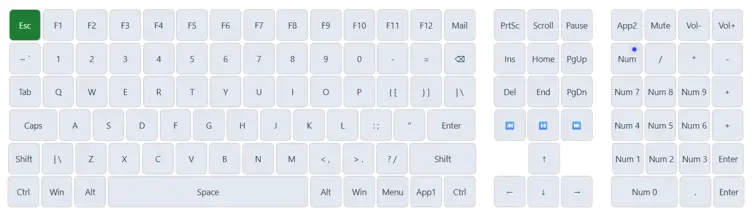
Now, after testing the Esc key, you have to check all the keys that are present in the same row, from F1 to F12 function keys, and so on for the other keys like 0-9, A-Z, Space, Enter, Left Shift, Right Shift, Backspace, Left Ctrl, Right Ctrl, Left Alt, Right Alt, all the Num Lock keys including the Num Lock and Caps Lock, Insert, Delete, Home, Left, Right, Up, Down arrow keys.
It is worth noting that the statistics clearly indicate that many users are looking for "cleaning laptop keys" and "functionality" after they accidentally spill something onto their device or have too much dust on their keyboard.
After carrying out a cleaning process, you have to conduct a diagnosis of the entire process to confirm that the liquid has not damaged the electronics permanently. The tester serves as the quality assurance process in this case.
Our tool provides another important function – the possibility to check for "ghosting." It takes place when certain key combinations are not registered by the computer during rapid typing or intense game time.
We found out that such search phrase as "test keys" are very popular and refer to testing the possibility of key rollover and the number of key inputs per second. With our tool, you will be able to press several keys at once and find out how many of them will be recognized by your computer. There are some tips to test your keyboard in detail.
- Systematic Testing: Start from the top-left "Esc" key and finish with the bottom-right "Enter" or "Num Pad" keys to test all the hardware completely.
- Testing Modifiers: Remember to test the Shift, Ctrl, Alt, and Fn keys, as they are the most vulnerable parts of the laptop.
- Rapid Presses Test: Press the keys fast to check if there is a "chatter" problem – when one keystroke is registered as several others.
- Long Presses: Press keys for long periods of time to test the presence of a constant signal, which is very important to identify problems with loose contacts or membranes.
The Role of Keyboard Layouts in User Experience
The majority of people are unaware of the fact that the problem of “keyboard not working” can easily be solved by checking their layout compatibility with the language settings in Windows.
If you happen to change your keyboard from US QWERTY to a UK or international layout, symbols such as “@” and “quotation marks” will shift their position. Performing a visual test will let you find out which character is being recognized by the computer, thus revealing the mistakes in the software mapping right away.
There are certain special layouts like “full keyboard layout”, which you usually use at a desktop computer and which contain a numeric keypad and navigation keys, and thus require a different test to confirm that everything works fine.
In the case of a laptop, users often face the situation with “compact layouts” where various functions of keys are combined through the secondary function (Fn) layer. Our test utility is capable of recognizing those inputs and giving feedback about them.
Even small delays or "stiff keys" in the professional environment of coding and data input might cause significant problems. With our online tester, you will be able to detect keys that have to be pressed harder than other keys. Fixing such a problem right away by cleaning the switch or by changing the specific keycap will help you avoid future hardware damage and ensure maximum typing speed.
Knowledge About the Search Surge for Keyboard Testers
It is evident from the data that such terms as "keyboard keys" and "test keys" are highly searched continuously, meaning that there is a permanent need for users to test the reliability of their hardware.
With remote work becoming standard practice for millions of people worldwide, the keyboard has become the most important component of the home office arrangement. Upon the occurrence of the "laptop keyboard not working" situation, the user immediately starts searching for a convenient tester that would help him or her to identify the issue.
What makes this even more interesting is the fact that the search volumes are extremely high. We observed that users do not want to download dedicated software just to test a keyboard the special software to just test the keyboard; that is why people just search “How to test keyboard online?” and within 2 or 3 minutes they find out that is there keyboard is working fine or not.
They do not download special software for this; that is why searches for “Keyboard Test” increase 900% year on year. Because the keyboard testers work fine in web browsers.
Conclusion: Data-Driven Hardware Verification
The demand for effective keyboard testing services has never been higher. There is no doubt about it because we observed an unbelievable 900% growth in the number of people searching for "keyboard tests." It proves once again that hardware reliability remains one of the main concerns of the contemporary global digital workforce.
The dhimanp ecosystem offers an excellent solution for the detected search trends that is totally free of charge. Become a part of millions of users who are taking matters into their own hands and using our unique diagnostic set regularly in order to keep their hardware in good shape.
Why put yourself through all the trouble of dealing with "keyboard not working" problems while there is a solution available with just one click? Accuracy and speed are our trademarks, and we provide you with the information you require regarding your hardware's performance right away.
Test your keyboard online using the fastest and most accurate tool you could find on the web, and rest assured that every keypress counts. You will be saving yourself a lot of time and money by doing so, not to mention avoiding frustration of any kind. Make sure that your keyboard speaks loudly in the digital world by testing it online.