Media Gallery
Learn GST Challan – Practice the GST Challan PMT-06 Challan for Free
Learn GST Challan is a virtual tax filing simulator tool. Basically, this is a replica of the GST portal. Learn GST Challan is a 100% free GST tax simulation tool. This is a free educational tool designed to help individuals understand and practice the process of generating GST challans in India.
Built with simplicity and clarity in mind, this interactive simulation offers a realistic experience that closely mirrors the actual GST portal — without any risk of submitting real data.
If you have a question like I want to learn GST, but a Goods and Services Tax login account is required- so how can I practice GST challan generation, then without any hesitation you should try this virtual GST simulator tool.
Basically, you can generate a GST challan through mock tax filing. This tool explains the GST filing process step by step. This tool acts as the best GST filing guide.
How It Works?
Step 1: Choose your Reason for Challan,either “Monthly payment for quarterly return” or “Any other payment”, and click on the “PROCEED” button.
Step 2: Now fill in the amount in the input boxes for CGST, IGST, CESS, SGST for tax, interest, penalty fees, and other.
For example: if you want to pay 8,000 in tax for CGST and SGST, then the tax amount for CGST will be 4,000, and for SGST, the tax amount should be the same as 4,000.
Step 3: Choose your payment method from “E-Payment”, “Over The Counter”, “NEFT/RTGS”.
- E-Payment: If you choose this mode, payment can be made through the bank’s internet banking system. When the payment process is completed successfully, the challan gets automatically updated.
- Over The Counter: Choose this mode if you wish to make payment by visiting an authorized bank branch. Create a challan and deposit it at the bank to make payment. OTC mode is applicable only for making payments up to ₹10,000. Payments beyond ₹10,000 can only be made through E-Payment or NEFT/RTGS mode.
- NEFT/RTGS: Select this mode if you wish to make the payment by bank transfer. First, create the challan and deposit the amount via bank by NEFT or RTGS method.
Suppose you choose the E-Payment mode; then the option to generate the Challan and save the challan is automatically enabled.
NOTE: At this point, you can change the challan reason, and you can also save the challan by clicking on its dedicated buttons.
Step 4: Click on the GENERATE CHALLAN button to generate the challan, and you will get a message at the top of the screen confirming whether your GST challan was generated successfully, along with the relevant details.
Now, review all the amount details that you entered in the earlier screen.
Step 5: Now choose your desired mode of E-Payment, select the bank, and check the box “I agree to the terms and conditions”.
After checking the box for I agree to the terms and conditions the MAKE PAYMENT button will be enabled. Click on this MAKE PAYMENT button to proceed.
NOTE: Before clicking on MAKE PAYMENT, please download your challan as a PDF by clicking on the DOWNLOAD button and verify it with the amount that you have entered with the payment mode and method.
NOTE: We did not mention any other type of restriction on entering the amount into the amount input boxes; please refer to the official GST Tutorial for these types of details.
Step 6: Now, the final step: make the online payment according to your selected payment mode, such as Net Banking, BHIM UPI, Credit/Debit Card, or Preferred Bank.
Watch Youtube Video
Key Features of Learn GST Simulator
- No Login or Registration Required: Practice generating GST challans immediately without signing up for an account.
- GST Challan Generation Simulated Environment: Practice by using an easy-to-use interface that simulates the process of creating a GST challan.
- Full Simulation of GST Challan Generation: Perform the process of generating a challan for the reason "Any Other Payment" GST-wise.
- Downloadable PDF Receipt: Create a PDF receipt of the challan created by you through simulation practice.
- View, Edit & Track Challans: View, edit, and track your previous practice challans with ease.
- Free Access Everywhere: Use the GST challan simulator completely free of cost from any device – mobile, tablet, laptop, or desktop.
- Great Tool for Education & Training: Ideal tool for learning, demonstrating, accounting practices, and GST training purposes.
- Easy to Use by Anyone: An easy-to-use interface that can be used by anyone, including beginners and students, business owners, accountants, and finance professionals.
- Instant & Reliable Calculations: Enjoy instant calculations while performing practice of the challan details.
- Safe Practice Without Payments: Learn the GST challan generation process without paying anything in reality.
What’s New
- Simulate GST challan creation in a risk-free environment
- Ideal for students, accountants, and GST learners
- Clean, user-friendly interface for easier understanding
- Disclaimer added: Practice tool only, not linked to official GST systems
Why Use the Learn GST Challan Simulator Tool?
If someone wants to practice the GST Challan PMT-06 Payment Challan on the official GST portal , a GST login account is required. Even if you want to practice filing the tax return, you cannot practice directly on the official GST portal due to official government data.
That is why we built this simulator tool so you can practice the GST Challans or do mock GST challans without any account and without any payment risk.
With the help of this tax simulation tool, you can become a master of the GST PMT-06 payment challan.
Featured Articles
Who is this app for?
- Whether you're an accounting student preparing for exams, a business owner new to GST, or a finance professional looking to train your team, this tool provides hands-on learning in a safe, guided environment.
What is a GST Challan Simulator?
Reel
What is a GST Challan Simulator?
Data
430+
1.6K+ Views on Instagram
Reel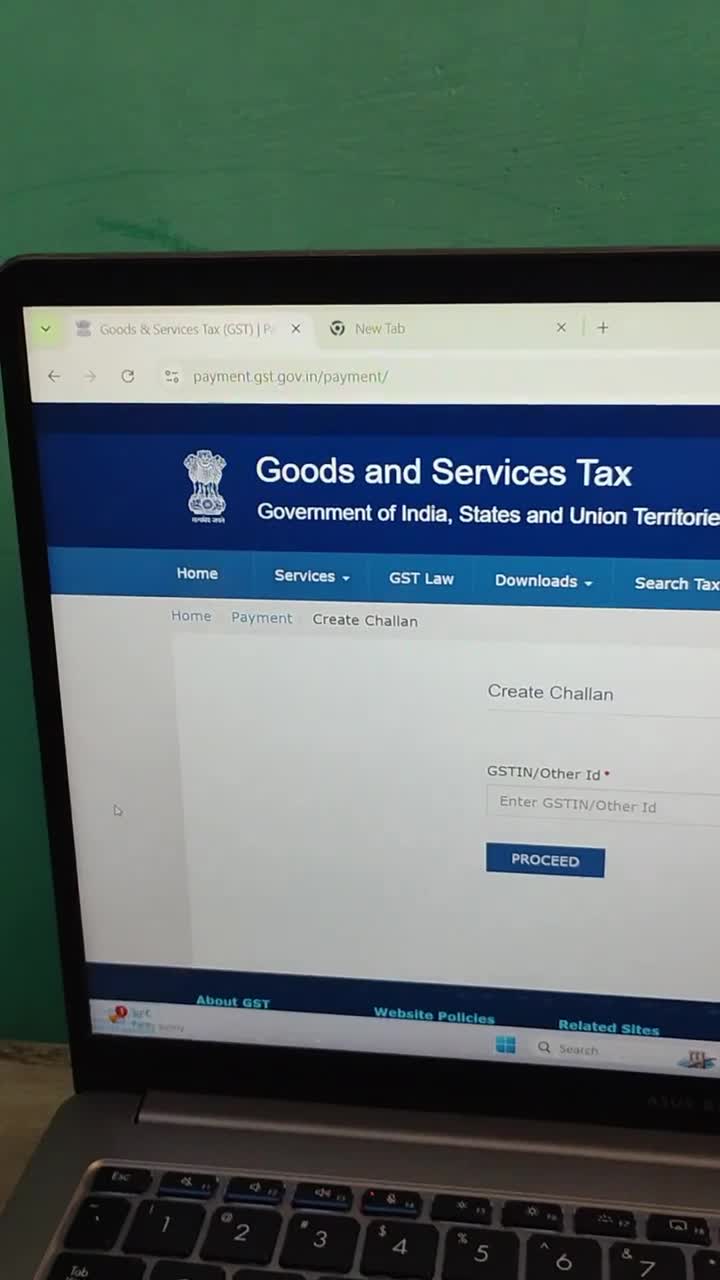
How to Practice GST Challan Online Without Login?
Data
1.6K+
28+
25+
45+
User Feedback 9 Total
❝Awesome! I can practice without any account.❞
❝Thank you for making this tool❞
❝This is a very good GST Challan Simulator with 100% risk-free.❞
❝As a teacher, I would like to say that this is the best tool for learning how to generate a GST Challan. I always recommend this to my students to gain practical knowledge before entering the professional world.❞
❝Agar app GST challan banana seekhna chahte hain ya apni practice karna chahte hain, toh ye app zarur use karein. 100% recommended 👍!❞
❝very good❞
❝good tool to practice❞
❝Badhiya he❞
❝Better than other due to no login required.❞
Rate this App
Reviews are published after a quick safety check (usually within 24 hours).
Reviews are public. Developers can see basic device specifications to respond. Learn more
Helpful Tools Available on dhimanp
dhimanp offers a growing collection of business apps, productivity, and educational web applications that complement Learn GST Challan.
Business owners, students and educators can also benefit from dhimanp's collection of remote learning utilities. These free online tools support productivity, digital education, improve learning efficiency, and simplify common academic tasks, making online learning more productive and accessible.
Why Choose dhimanp?
dhimanp focuses on creating free online business apps, student apps, and utilities that are practical, reliable, and easy to use. Every application is designed to improve productivity without requiring complicated installations or subscriptions.
Whether you need a Learn GST Challan Simulator, a dependable tax simulator, an accurate GST Calculator, a Loan or EMI Calculator or Cash Calculator, or QR codes or posters for your business, dhimanp provides an all-in-one platform for students, professionals, developers, businesses, and everyday users.
Privacy Policy
Learn GST Challan does not collect personal data from users. However, if users choose to send feedback or contact the developer, the information they provide (such as message content) may be received and used only to respond to the feedback or improve the app. We do not sell or share user information with third parties.
Disclaimer
Learn GST Challan is an educational app and is not affiliated with or endorsed by the Government of India or GSTN. The information provided is for learning purposes only and should be verified from official sources.
Frequently Asked Questions
1. What is a GST Challan Simulator?
A GST challan simulator is a risk-free training tool or mock environment that mimics the official Goods and Services Tax (GST) portal. It lets students, accountants, and business owners practice generating tax challans, depositing dummy cash, and filing returns without using real money or live data; hence, it is 100% risk-free.
2. Is any account needed for GST Challan Simulator?
No, on the dhimanp GST Challan Simulator, you do not need any account. You are totally free to practice GST Challan at any time and on any device.
3. Is the GST challan simulation portal secure?
Yes, the GST challan simulation portal is 100% secure. This is just a practice portal with no impact on your actual GST returns, with zero payment risk and no login required. You may safely use it for practicing return filing without worry.
4. Why is the GST Challan Simulator 100% risk-free?
Because there is no payment method added to the dhimanp Learn GST Challan Simulator! So, You can practice creating tax challans using dummy data with zero risk of losing money or messing up real data.
5. What is CPIN in the GST Portal?
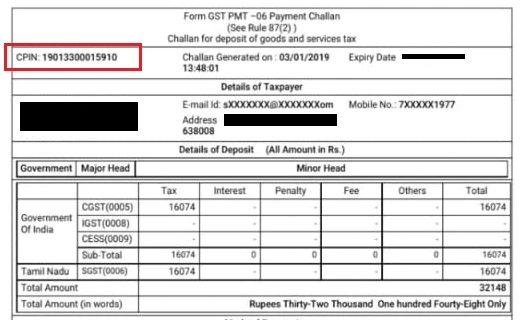
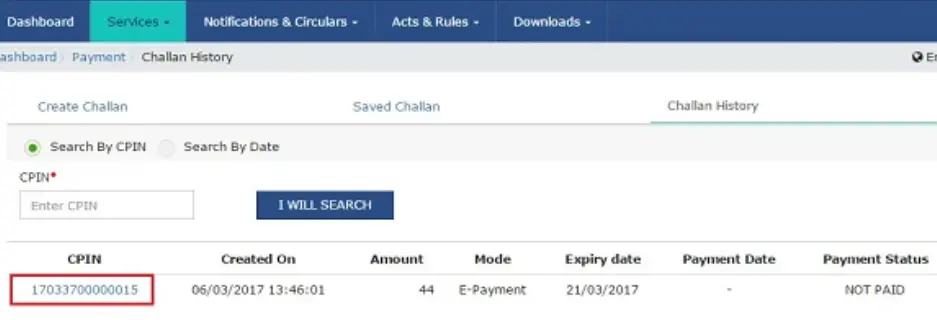
CPIN (Common Portal Identification Number) is a unique 14-digit identification number generated for a GST Challan on the GST Portal (For example: 17033700000015). This CPIN is valid for up to 15 days from Challan generated. Once the CPIN expires, you need to generate a new challan.
6. What is CIN?
When the payment is made for the generated CPIN GST Challan, this CPIN is converted into the final CIN (Challan Identification Number), which is a 17-digit number. Example of CIN: 17033700000015HDF.
7. How to find CPIN in GST?
There are two methods to find CPIN
1st Method (Easy and Recommended):
Step 1: Log in to the Official GST Portal.
Step 2: Go to Services > Payments > Challan History.
Step 3: Choose the Search by Date option (select the date range for when you clicked Generate) and click Search.
Step 4: A list of your generated challans will appear. Your 14-digit CPIN will be visible right there as a clickable blue link.
2nd Method (Find in downloaded GST Challan PDF receipt)
Step 1: Download the generated challan PDF receipt.
Step 2: Now find the CPIN at the top left, 2ndrow.