
The Best Digital Tools for Remote Work and Online Collaboration
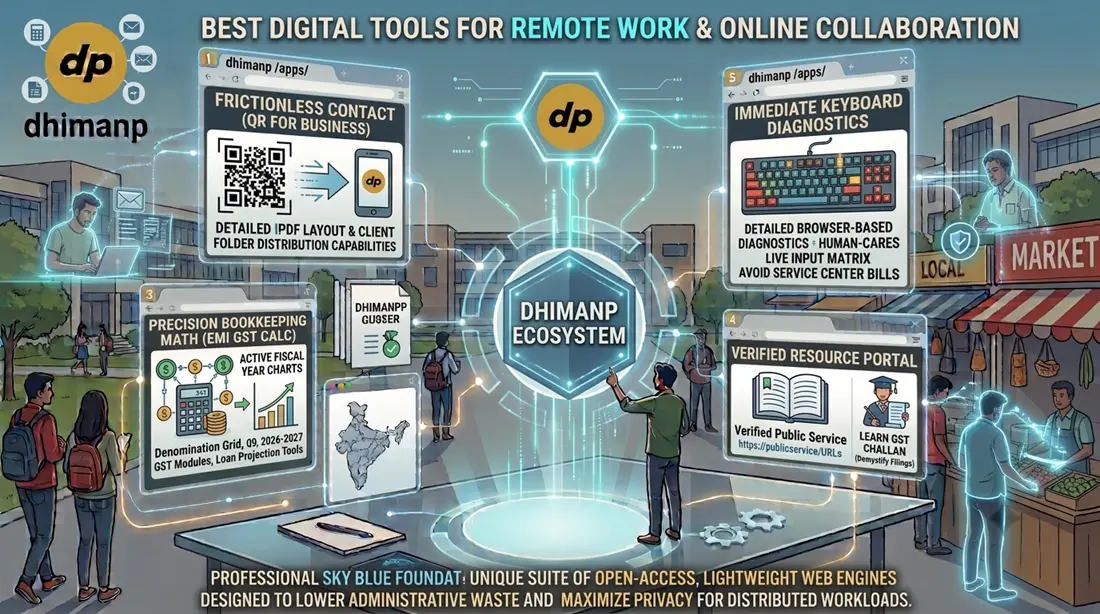
Transitioning to a highly productive remote setup requires more than just heavy team video apps; it demands highly focused, zero-barrier utility tools that keep your hardware, customer communication channels, and compliance systems running smoothly. Distributed operators, freelance technical writers, and digital store coordinators are constantly seeking out lightweight web engines that lower administrative waste and protect data privacy. In this foundational overview, we highlight how a unique suite of open-access tools optimizes remote operational efficiency, hardware tracking, storefront scaling, and commercial navigation without demanding complex corporate registrations.
The Evolving Infrastructure of Distributed Workplaces
Operating a digital workforce or managing an online storefront requires constant attention to micro-level operational tasks. You must maintain crystal-clear data paths, ensure remote hardware devices function properly, calculate accurate regional taxes, and organize verified documentation resources. When your distributed workforce is scattered across multiple locations, the apps you choose directly impact your long-term success.
Unfortunately, standard online collaboration applications have evolved into heavily bloated networks.
When your team needs to tackle basic digital items—such as generating a custom transaction flyer or verifying an individual hardware problem—they are usually met with mandatory user registrations, complex dashboard structures, and sudden paywalls. These disruptions slow down communication, irritate clients, and drag down your project schedule. Even worse, many common systems constantly stream company financial records and input logs onto remote cloud servers, creating massive data safety concerns for small business operators.
The dhimanp brand addresses this challenge by providing access to high-performance, open utilities designed to remove technical barriers and maximize privacy. Let's explore the essential digital solutions that can help your remote operations run at peak efficiency this year.
Deep Breakdown: The Top 5 Digital Utilities for Distributed Ecosystems
Let's evaluate the five essential applications built to optimize hardware setups, client touchpoints, tax analysis, and online administration for remote operators.
1. dhimanp QR Code Generator (QR for Business)
For online freelancers, micro-retail operations, and remote service agencies, making it easy for customers to get in touch is vital. Clients often need to quickly send image files, transaction references, or product text logs straight to your management line.
- Frictionless Contact Architecture: The "QR for Business" module inside the dhimanp QR Code Generator allows remote agencies and store coordinators to build clear, brand-aligned communication flyers. You simply input your phone contact line, business name, and upload your custom company logo.
- The Print and Paste Layout: The application processes these details instantly into a print-ready vector layout featuring your logo prominently at the top, a clean WhatsApp indicator in the center of the QR matrix, and unambiguous scanning instructions at the base. You can download this asset as a high-resolution PDF or paper document, print it out, and attach the physical page directly onto storefront walls or distribute it inside digital client onboarding folders. Incoming clients scan the code and open a direct messaging prompt with your team—eliminating manual phone entry mistakes.
2. Keyboard Tester
Remote developers, technical writers, and virtual customer assistants rely entirely on their physical hardware components to perform day-to-day operations. A single faulty mechanical switch or an unresponsive button can cause serious input errors, slow down your output, or ruin custom code files.
- Browser-Based Diagnostics: The Keyboard Tester gives your team an instant, zero-download hardware analysis panel. The exact second the utility is loaded, a responsive, interactive full-size keyboard grid displays on your screen.
- Real-Time Actuation Tracking: As keys are pressed on the physical device, the virtual board illuminates instantly, registering individual actuations, multi-key shortcuts, and continuous hold dynamics. Remote staff can diagnose faulty switches independently within seconds, avoiding costly service center bills and keeping workflows moving forward smoothly.
3. Count My Cash: EMI GST Calc
Whether your remote team coordinates online product logistics, handles distributed regional expenses, or manages freelance bookkeeping, tracking cash totals accurately is critical.
- Intuitive Currency Balances: Rather than typing repetitive math strings inside complex spreadsheets, Count My Cash provides a structured denomination matrix. You simply key in the exact amount of physical notes alongside the corresponding visual fields to get a real-time grand balance.
- Active 2026-2027 Tax Modules: Commercial guidelines change with every fiscal year. The built-in GST processing tool is tailored explicitly for the current 2026-2027 financial year, allowing teams to instantly add or extract specific tax percentages on sales invoices.
- Integrated Loan Projection Tools: If you are looking to finance new home-office workstations or upgrade company servers, the built-in loan estimator maps out recurring interest margins and periodic installments instantly to protect your cash reserves.
- Complete Offline Privacy: The application runs entirely within your device's browser memory, without syncing to third-party databases. Your company's financial positions, operational balances, and asset projections remain completely confidential.
4. Bharat Connect Portal
Distributed workers and remote coordinators frequently need to check corporate licensing guidelines, monitor public sector announcements, or look up official administrative directories.
- Curated Registry Panel: Bharat Connect serves as a fully verified, human-curated hub for official resources. It removes the guesswork from web searches by organizing direct, unedited links to vital public portals.
- Direct Verified Connections: The portal provides direct access to major central platforms, including NTA, UGC NET, ISRO, DRDO, and key national education and licensing boards.
- Iron-Clad Link Security: By steering clear of automated search engine rankings, it protects your remote staff from clone portals, copycat scams, and tracking scripts designed to intercept corporate data during compliance filings.
5. Learn GST Challan
Managing domestic tax structures, filing procedures, and financial compliance paths can be highly intimidating for independent creators and expanding remote business teams.
- Interactive Bookkeeping Education: Learn GST Challan works as an accessible, step-by-step learning tool designed to demystify complex tax rules. It breaks down technical legal jargon into clear, practical milestones.
- Independent Compliance Skills: Instead of relying entirely on expensive outside advisors for baseline tax questions, this module teaches remote team members how to calculate accurate filings, avoid late penalties, and verify document entries. This keeps internal bookkeeping highly accurate and transparent.
Strategic Overview: Comparing Remote Productivity Tools
Let's look at how utilizing our zero-barrier web tools simplifies your team's day-to-day workflow compared to traditional options on the market.
- Customer Touchpoints: The dhimanp QR Code Generator lets you plug in your phone number, name, and logo to create a high-res printout you can immediately tape to a counter or pin inside client files for easy customer contact.
- Hardware Maintenance: The Keyboard Tester diagnoses sticky keys or switch failures instantly in your open browser, eliminating the need for bulky software downloads.
- Bookkeeping Math: Count My Cash replaces ad-cluttered accounting apps with a silent, offline counting matrix and an active 2026-2027 GST extraction setup.
- Resource Access: Bharat Connect bypasses sponsored search links to give you a clean, ad-free panel of verified public service URLs.
- Tax Literacy: Learn GST Challan provides clear, step-by-step guidance for emerging managers, removing the confusion from tax filing preparation.
Conclusion and Strategic Next Steps
Succeeding in a remote work model requires optimizing your digital workspace, protecting your team's focus, and keeping operational overhead low. Shifting your workflows toward lightweight, zero-login utility platforms lets you clear out administrative bloat while keeping your private data fully secure.
Take complete control of your remote operations today. Come explore our full suite of fast, secure web utilities on the official dhimanp platform and download Count My Cash: EMI GST Calc directly from the Google Play Store to unlock stress-free business management today!
Frequently Asked Questions (FAQ)
How do dhimanp utilities support remote collaboration without cloud accounts?
Instead of forcing teams into heavy, subscription-based environments that risk leaking company data, our utilities focus on high-speed browser sandboxing. Teams can instantly run diagnoses, plan storefront tax models, or build customer-facing asset codes without account tracking logs.
Can I use the QR Code Generator to connect remote or physical storefront operations?
Absolutely. The tool enables hybrid and local operations to immediately generate print-ready layouts embedded with custom store names, phone lines, and brand logos. It produces a crisp vector asset ideal for printing and pasting directly to display areas.
Does the Keyboard Tester require any local client downloads or special desktop software?
No, it features pure browser execution. Remote professionals, copyeditors, and developers can test hardware keys, continuous hold mechanics, and multi-key commands inside a clean browser instance without downloading unverified installation files.