
What is a GST Challan & How to Create It Online
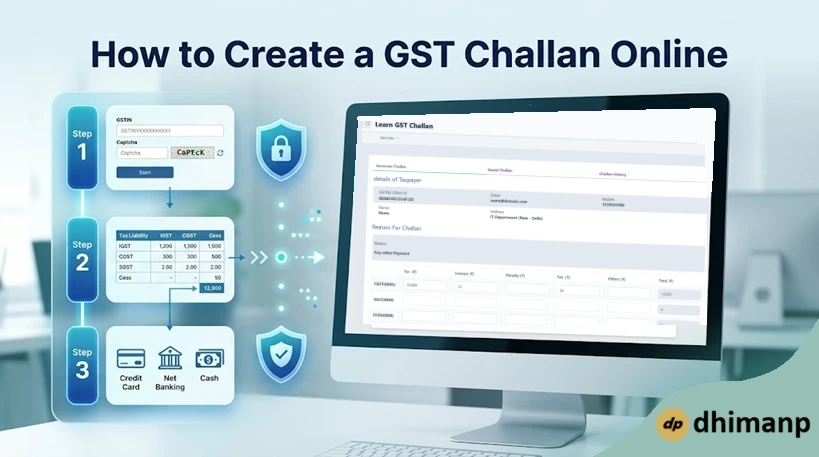
Handling GST can sometimes be a challenging task for many business organizations as well as students. One of the most important components of this tax is the GST Challan, which is used as the payment document.
This article will help you understand the process involved in creating these payments successfully. In this comprehensive guide, we will see what a GST challan is, along with its importance in the Indian taxation system.
We will discuss various payment modes available and then take a deep dive into the step-by-step procedure to create the GST challan online. The article also covers an innovative simulation tool that is created for students.
What is a GST Challan?
A GST Challan (GST PMT-06 Form) is an official document generated on the GST portal to facilitate the payment of taxes, interest, penalties, or fees. It acts as the primary instrument for depositing money into the government's account through authorized banks or digital payment modes.
Without this document, the GST Network (GSTN) cannot identify which taxpayer is making a specific payment for which tax head. The challan contains crucial information such as the GSTIN of the taxpayer, the amount of tax under different heads, and the payment mode.
It ensures that your tax liability is correctly mapped to your electronic cash ledger for future use. Understanding how to handle this document is the first step toward achieving total tax compliance in India.
Why is the GST Challan Important?
The GST framework works mainly on the concept of self-assessment, wherein the taxpayer assesses his liability himself and makes the payment. The challan acts as the link between your bank account and the consolidated fund of the government in terms of tax collection.
It acts as a digital paper trail that protects both the taxpayer and tax authorities in the course of an audit.
- Track Payments: This will help the GSTN in tracking all rupees that are deposited against your GST Identification Number.
- Evidence of Payment Request: Any challan generated will act as legal evidence that you have requested a payment of a certain amount.
- Update Ledgers: The challan details help in updating your Electronic Cash Ledger immediately after successful payments.
Mechanics Behind a GST Challan
- Preliminary Step: Creating a challan does not mean the deduction of any amount, but it is rather an instruction for the bank.
- Wallet Concept: Payment of a challan means the transfer of money from your bank account to your GST electronic wallet.
- CPIN: A 14-digit common portal identification number (CPIN) is available for each generated challan to identify the transaction.
- Duration: The period of validity for a GST challan is exactly 15 days after its creation online. If the challan is not settled within this period, then it becomes invalid.
Modes of Payment
| Payment Type | Methods Allowed |
|---|---|
| Online Payment | Net Banking, Debit/Credit Card, Unified Payments Interface (UPI) |
| Over the Counter (OTC) | Cash, Cheque, or Demand Draft (limited to ₹10,000 per tax period) |
| Institutional | NEFT or RTGS (from any RBI-authorized bank) |
Key Information Displayed on a Challan
- Taxpayer Details: The business's GSTIN, legal name, and address.
- Breakdown Matrix: A strict grid where you specify the precise amount being paid under Major Heads (CGST, SGST, IGST, UTGST) and Minor Heads (Tax, Interest, Penalty, Fee, Other).
- Payment Identifiers: The 14-digit CPIN, generation date, and chosen payment mode.
How to Create a GST Challan online?
It is a very simple procedure to create a challan, and that too even before logging in or after logging in to the GST portal. Below is the list of steps to create the GST Challan online; follow them.
- Navigate to the official GST Portal.
- Now click on the Create Challan button under the Services > Payments section.
- Now log in with your GSTIN or other ID.
- Select the reason either as Monthly payment for quarterly return or Any other payment.
- Click on the PROCEED button.
- Fill in the details of the amount in the input boxes for the CGST, IGST, CESS, and SGST.
- Select the Payment Modes.
- After filling in all these details, click on the GENERATE CHALLAN button.
Watch the below-mentioned video to know the complete process in detail.

Common Issues & Suggestions to Overcome Them
1. Payment Failure or Timeout Issues
There are certain issues faced by taxpayers, which include a timeout during the payment process or incorrect heads. It is advised to double-check the "Total Challan Amount" before proceeding to the final step. In case of payment failure but deduction of amount from the bank account, wait for 24 hours before attempting the process again.
2. Challan Expires
Another factor to be considered while filing a GST Challan is the expiration of the challan. GST Challan expires 15 days after the challan. Thus, it is advised to complete the payment before the 15-day deadline, or else a new challan would need to be generated. Keeping the browser updated and maintaining an internet connection can help avoid technical issues.
3. Check GSTIN: Make sure to check the name of the taxpayer, which appears after the GSTIN input on the portal.
4. Verify Heads: Ensure that interest and penalties are entered in the respective rows and not the main row of tax.
5. Take Note: Download the PDF version of the generated challan and its payment receipt.
Key GST Terms That You Need To Know
- CGST: It is the central goods and services tax charged by the central government on intra-state sales.
- SGST: It is the state goods and services tax charged by the state government on intra-state sales.
- IGST: It is the integrated goods and services tax charged by the central government on inter-state sales and imports.
- GSTIN (GST Identification Number): Unique alphanumeric 15-digit number allotted to all registered taxpayers.
- ITC (Input Tax Credit): Method through which businesses can offset their tax liability on output through the credit of tax paid on input.
- Composition Scheme: A simple scheme available to small business entities having turnover up to ₹1.5 crore.
- HSN Code (Harmonized System of Nomenclature): International 4 digit/6 digit/8-digit code used for the classification of goods.
- SAC Code (Services Accounting Code): A coding structure that is used for the classification of services only.
- E-Way Bill: Electronic waybill that is required to be generated for the transportation of goods worth more than ₹50,000.
- RCM (Reverse Charge Mechanism): Method under which the liability to pay the tax shifts from the supplier to the receiver.
Master the Process Using Learn GST Challan App
If you are a student or a businessman who is afraid of committing an error while filing taxes on the official website, then you do not have to worry anymore. Using the Learn GST Challan Web App, you can get acquainted with the whole process safely. This application creates an interface that will allow you to study without the fear of losing money.
Created by dhimanp, this learning app is a great resource for professionals and beginners alike to get confident about their tax filing. The interface of this website is similar to the official one, but it will let you practice the whole procedure rather than learning it from pictures and text in the books.
Official Guidelines and References
For all those who wish to go through the nitty-gritty of this topic, the government has made available detailed information on payment procedures. You can consult the Official GST Documentation for details on CIN in relation to payments.
Knowing the backend procedure of how a bank interacts with the portal will be very helpful in solving disputes on payments. The official guidelines explain what 'CPIN' (Common Portal Identification Number) and 'BRN' (Bank Reference Number) stand for.
CPIN and BRN numbers are crucial in contacting the GST Helpdesk in case your payment does not get reflected in your ledger. Knowing the meaning of these terms will enable you to solve administrative problems that may occur during the tax year.
Conclusion
The GST Challan is an important document for every taxpayer in India, being the main source for tax deposits. Being able to generate a GST challan online not only means complying with laws but also avoiding additional penalties for the failure to deposit tax in a timely and correct manner.
With the information provided in the article above and the use of educational web sources, you can easily deal with your tax payments. Should you have any questions or need help with web financial tools, please feel free to contact us via the Contact Page.
Being aware of new laws and using the latest web tools is the best way to comply with the constantly changing system of taxation in India. Remember that proper tax filing helps both in the development of the country and in the legality of your business.